onsdag 7. august 2013

Simple Brew Incubator - Parts: thermo element

I intend to use two thermo sensing elements as inputs for the Simple Brew Incubator regulator (Raspberry Pi). There are many options to choose from (e.g. PT100 or ThermoCouple) - I've decided to use the 1-wire protocol based DS18B20 digital thermometer.

DS18B20 digital thermometer:

The DS18B20 digital thermometer is a neat little thing. It usually comes in a TO92-encapsulation (like a regular transistor), but I've bought a modified version which is more practical for this application, see image below. It is waterproof so I don't have to worry about short-circuits and it's already pre-wired meaning less hazzle connecting it to the control system.

The DS18B20 uses the 1-wire protocol. There is heaps of documentation for it, but the thing that appeals to me is the fact that is is very easy to electrically connect to the system, I don't have to worry about measurement inaccuaracy since the signal is digital, and I can connect several 1-wire sensors to the same input pin on a microcontroller (Raspberry Pi in my case).

Electrical connection:

NB: Do not connect while the Raspberry is powered. It might not ruin anything, but it don't take any chances. In any case it is good practise to power things off before you (dis)connect anything electrical.

Despite the name, it actually has three wires. One is for the actual data signal, the two others are electrical ground and power. Note that this is a simplification. To hook it up to the Raspberry Pi, see the below connection diagram.
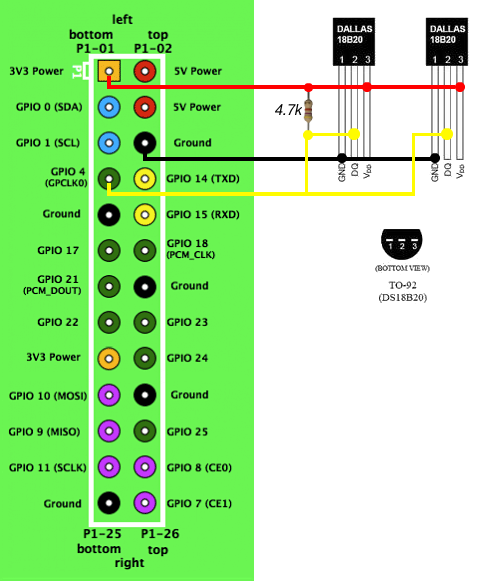

Raspberry Pi GPIO  with two 1-wire thermo elements connected
This diagram shows the TO92-encapsulation of the sensor connected to the I/O-pins of the Raspberry Pi. I bought the waterproof version, and cleverly enough, this colour of the wiring in this diagram correspondents to the colour of the actual sensor wires. And, if you buy it from Adafruit, they have even shipped a 4.7kohm resistor as well.

There are two sensores connected in this diagram, but you can connect as many as you like to the same pins following this layout. Note that you don't have to use GPIO pin 4 of  the RPi, any of the green ones will work (and possibly others as well).

That's really all there is to the electrical connection of the thermo elements.


Software coding (using Python):

In a  future post I'll describe how to actually read the temperature data on the Raspberry Pi. If you are in a hurry, please see the revered blog at the top of this post.


I got the inspiration from this blog, please have a look at it for more on brewing with the Raspberry Pi.


-The Engineer-


Simple Brew Incubator - Parts: shopping list

If you follow this blog, and want to start testing and experimenting with the elements and components of the Simple Brew Incubator, this post will tell you what I've bought so far, and what I'm planning to buy. It will help you to buy most stuff in one place, and hopefully reduce the shipment costs. Many of the items might also be taken from discarded electronics.

Although the mini-computer Raspberry Pi in the shopping list is sufficient for programming purposes, I do recommend you use a regular computer in parallel while experimenting though, (at least that is the approach I've been using). I'm also connecting the Raspberry Pi to the same router as my main computer on.

Most of my links are to the webshop Adafruit. This is purely due to practical reasons of linking; there are many webshops selling the same equipment, and I've also used eBay for obtaining some of the components.

Main items:


  • Raspberry Pi w/casing + SD card
  • Raspberry Pi power supply
  • Temperature sensors
  • Relay module
  • Fridge

Electronic accessories:


  • Breadboard wires; male-male, male-female, female-female
  • Breadboard
  • Assorted electronic components (resistors, LEDs, etc.)
  • Raspberry Pi breakout board + cable

fredag 2. august 2013

Simple Brew Incubator - Setup


NB: To get an overview of related blog posts for this project, please see the Start Page

Main purpose and specs:

The main purpose of the Simple Brew Incubator is to provide a stable atmosphere (i.e. temperature) for beer during the fermentation stage. With the beer I'm planning to make, a temperature of 18-20*C is necessary, but I've set the spec for the incubator have a setpoint range between 4-25*C. I also want to be able to remotely monitor real-time temperature via the web, preferably as a graph. The volume of the incubator should be large enough to hold a tank of ~30 liters, and it should be easily accessible for both inserting/taking out the tank and cleaning purposes. Finally, the incubator and it's controllers must be relatively cheap to purchase and set up.

I quickly made the sketch below to visualize the desired setup (click on image for a bigger version). Section details are described further down the post.

The incubator:

Heat is a bi-product when fermenting beer, so using an old fridge seems logical for an incubator, as it's purpose is already to cool things down. A fridge is also ideal in terms of accessibility and maintenance purposes, and finding cheap used (or thrown away) ones should not be a big issue.

By replacing the existing thermostat with a electro-mechanical relay it's possible to regulate the maximum temperature above the factory settings of a fridge. And by adding a heater element, also the minimum temperature can be regulated. Measuring the temperature in the incubator volume and/or in the liquid itself will provide the regulator with the necessary input, and the heater and fridge compressor will be controlled by regulator outputs. I've also added a fan inside the fridge to get air circulation, hoping to avoid any cold or hot zones.

The control system:

I'm totally aware that there are much cheaper ways of making the control system, for instance you could make it totally analog with very few components. But I have a fascination for the immensely popular and brilliant mini-computer Raspberry Pi (aka RPi), so I've chosen it to be the brains of the system. It can serve as both a regulator using it's I/O-pins and a web application server using the Ethernet-port for connecting to the web. I haven't yet decided exactly what kind of programming language to use or which web applications to install, but I'm looking forward to find out what options are out there. In any case the RPi runs a Linux OS, so that will be interesting as I've primarily used Windows in the past.


With all that in place, it's time to start acquiring the components! Please check in later to how that turns out in the next post :)
-The Engineer-